SaaS lifecycle comparison · Prices checked October 7, 2026
Encharge vs Customer.io: Pricing and Fit for SaaS
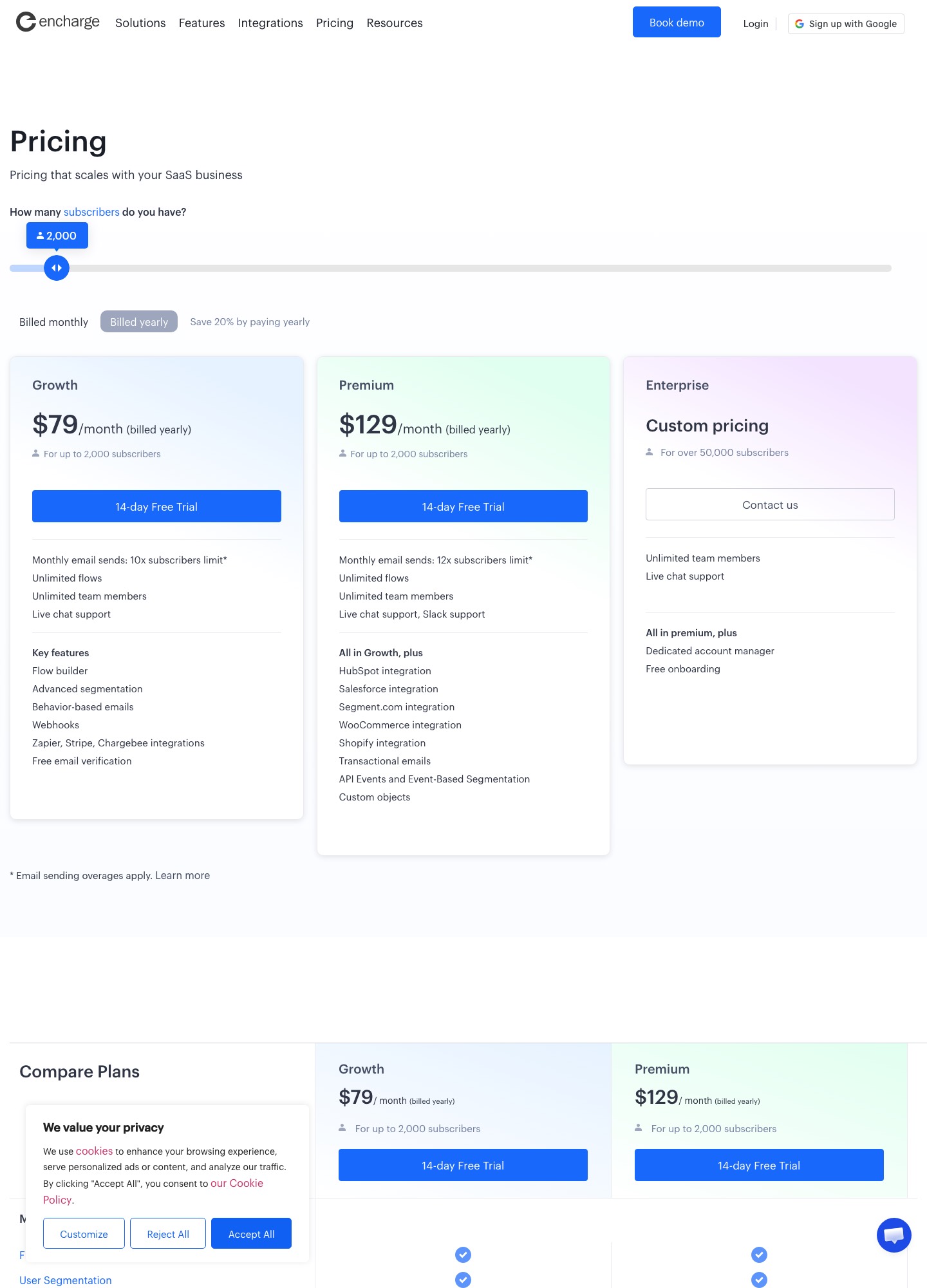
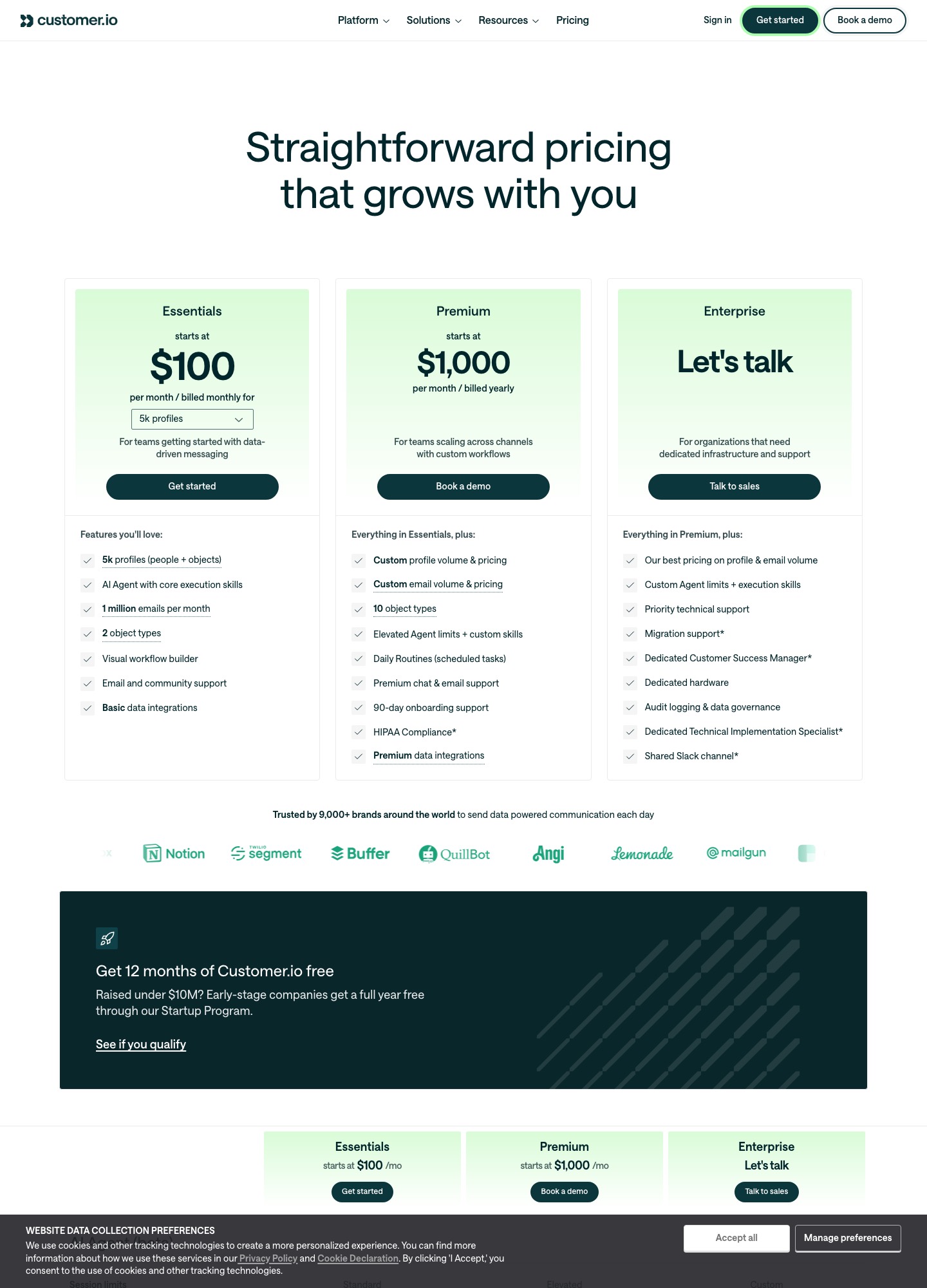
Pick Encharge if one marketer needs to run onboarding and trial-conversion flows without engineering help and wants a price that rises in visible steps with your list. Pick Customer.io if your product already emits events, you want email, push, in-app and SMS in one workspace, and you are comfortable asking sales for a number once you outgrow 5,000 profiles. Encharge lists $99/month for up to 2,000 subscribers; Customer.io lists $100/month for 5,000 profiles.
The two tools sit in the same category and are routinely shortlisted together, but they bill on different units. Encharge counts subscribers and caps monthly sends at a multiple of that count. Customer.io counts profiles, and its pricing page says those profiles include people and objects such as companies, so an account-heavy B2B product can reach the 5,000 mark sooner than its user count suggests. That one difference shapes most of the cost comparison below.
Side by side
| Decision point | Encharge | Customer.io |
|---|---|---|
| Entry price (monthly billing) | Growth $99/mo for up to 2,000 subscribers; Premium $159/mo | Essentials from $100/mo, quoted for 5k profiles |
| Annual billing | Growth $79/mo, Premium $129/mo at 2,000 subscribers (yearly billing, 20% off) | Premium from $1,000/mo billed yearly; Essentials is listed as billed monthly |
| Billing unit | Subscribers; sends capped at 10× (Growth) or 12× (Premium) of that count | Profiles (people and objects); Essentials includes 1 million emails a month |
| Free tier | None listed; 14-day free trial | None listed; 12 months free through the Startup Program if you raised under $10M |
| Automation | Visual flow builder, behavior-based emails, unlimited flows on both plans | Visual workflow builder, LLM actions, send-time optimization, A/B and multivariate testing |
| Segmentation and data | Advanced segmentation on Growth; event-based segmentation and custom objects on Premium | Two object types on Essentials, ten on Premium; reverse ETL; MCP server |
| Channels | Email, plus transactional email on Premium only | Email, push, in-app, WhatsApp, LINE; SMS volume is custom; transactional email included |
| Integrations | Zapier, Stripe and Chargebee on Growth; HubSpot, Salesforce, Segment, Shopify and WooCommerce on Premium | Basic data integrations on Essentials; premium data integrations on Premium |
| Deliverability features | Free email verification on all plans; sends go through AWS, with one-on-one deliverability help offered | Email content analysis and send-time optimization listed; no dedicated deliverability service named on Essentials |
Everything above is from the two vendors' pricing pages. Where a row is blank for one tool (for example, Customer.io's page does not describe a deliverability service for Essentials), that means the page is silent, not that the feature is missing.
Cost at three list sizes
Encharge's slider shows a published price at each step, so the numbers below are what the page displayed with monthly billing selected. Customer.io publishes one self-serve price point, which is why its column thins out.
| Audience | Encharge Growth | Encharge Premium | Customer.io |
|---|---|---|---|
| 2,000 subscribers or fewer | $99/mo ($79 billed yearly) | $159/mo ($129 billed yearly) | Essentials $100/mo (covers 5k profiles) |
| 5,000 subscribers | $179/mo | $269/mo | Essentials $100/mo at the 5k-profile limit |
| 10,000 subscribers | $249/mo | $399/mo | No price on the page; Premium starts at $1,000/mo billed yearly |
| 25,000 subscribers | $389/mo | $649/mo | No price on the page; talk to sales |
Two worked examples show how the units interact. A product with 4,000 users and 400 customer companies tracked as objects sits at roughly 4,400 profiles, inside Essentials' 5k limit at $100/month, while the same list on Encharge Growth is the 5,000-subscriber step at $179/month. Now take 10,000 users sending eight lifecycle emails each per month, about 80,000 sends: Encharge's Growth cap at the 10,000 step is 10× the subscriber tier, or 100,000 sends, so the volume fits at $249/month, while Premium's 12× multiple would give 120,000 at $399. Customer.io's 1 million monthly sends are far above that volume, but you would need a custom quote for the profile count. Encharge also charges $100 per extra 100,000 emails if you exceed your cap, which is worth modelling before a big announcement send.
Customer.io's page does not say its price jumps above 5,000 profiles; it simply stops showing one. Treat that as a reason to request a quote early, with your profile count including company and object records, before you build flows you might later re-platform.
Where Encharge is the better choice
Encharge is aimed at a marketer or founder who wants to wire a trial, activation and upgrade sequence together quickly. Unlimited flows and unlimited team members are included on both plans, so you are not rationing automations by seat. Its Growth plan connects to Stripe, Chargebee and Zapier, which covers the common trial-to-paid trigger without custom code. The plan ladder is easy to read: you move the slider and the price changes in steps you can see.
The trade-off is that several things SaaS teams eventually want sit behind Premium: transactional email, the HubSpot and Salesforce integrations, Segment, Shopify and WooCommerce, event-based segmentation and custom objects. If you know you need password-reset or receipt email from the same tool, or you run your CRM in HubSpot, price Premium from the start rather than Growth. Encharge's own FAQ also says you cannot use it for cold or outbound email; it is for people who gave permission, which suits a product-led audience.
Where Customer.io is the better choice
Customer.io is built around data you send it. Essentials includes two object types, the visual workflow builder, and an AI agent with core execution skills, while the channel table lists unlimited push and in-app messaging and native WhatsApp and LINE. If your product team already tracks events and wants the same journey to reach a user by email, then a push, then an in-app message, one workspace is simpler than stitching three tools. Transactional email is included in all three listed plans rather than reserved for the upper tier.
The cost is operational. Essentials is quoted monthly only, anonymous messages are not included until Premium, and the next published price is $1,000 a month billed yearly. A team that grows from 5,000 to 15,000 profiles has to have a sales conversation. There is one genuine counterweight: companies that have raised under $10M can apply for twelve months free through the Startup Program, which can change the first-year math entirely.
Choose Encharge if…
- A marketer, not an engineer, will build and edit the flows.
- Email is the only channel you need today.
- You want a published price at 5,000, 10,000 and 25,000 subscribers before you commit.
- Stripe or Chargebee events are your main triggers.
Choose Customer.io if…
- Your app sends events and you expect to add push, in-app or WhatsApp.
- You track accounts or other objects alongside people and need that data model.
- You qualify for the Startup Program or can budget the $1,000 Premium floor later.
- You want transactional email in the same workspace from day one.
Migration notes
Moving from Encharge to Customer.io means translating subscribers into profiles. Export your people with their properties, decide which Encharge custom objects become Customer.io object types (Essentials allows two), and rebuild each flow from its trigger and exit rules. Encharge ingests data through Segment, an ingest API and JavaScript tracking, so the same event feed can usually be pointed at Customer.io in parallel while you test one flow at a time.
Going the other way is a scope reduction. List the Customer.io channels you actually use; push, in-app and WhatsApp messages have no Encharge equivalent, so decide where they live next. Encharge's yearly Premium plans mention free done-for-you onboarding and migration with a limit on transferred emails and flows, so ask what that limit is before assuming your whole library moves for free.
FAQ
Is Encharge cheaper than Customer.io?
At the entry point they are close: $99 a month for 2,000 subscribers versus $100 a month for 5k profiles. Past 5,000 profiles Customer.io's page stops listing prices, so you cannot compare them directly without a quote.
Does either tool have a free plan?
Neither lists one. Encharge offers a 14-day free trial, and Customer.io's Startup Program gives eligible companies, those that raised under $10M, twelve months free.
Which is better for transactional email?
Customer.io lists transactional email as included in every plan. On Encharge it is a Premium feature, so Growth customers would need a separate sender for receipts and password resets.
What happens if I exceed Encharge's send cap?
Encharge's pricing page says exceeding the allowed monthly sends is charged at $100 for every 100,000 emails. Check your largest send month against the 10× or 12× multiple before picking a tier.
Continue with Customer.io vs Drip, see Encharge alternatives or Customer.io alternatives, or browse the SaaS comparisons hub. See our evaluation method.