SaaS lifecycle comparison · Prices checked October 7, 2026
Userlist vs Intercom: Lifecycle Email vs Support Suite
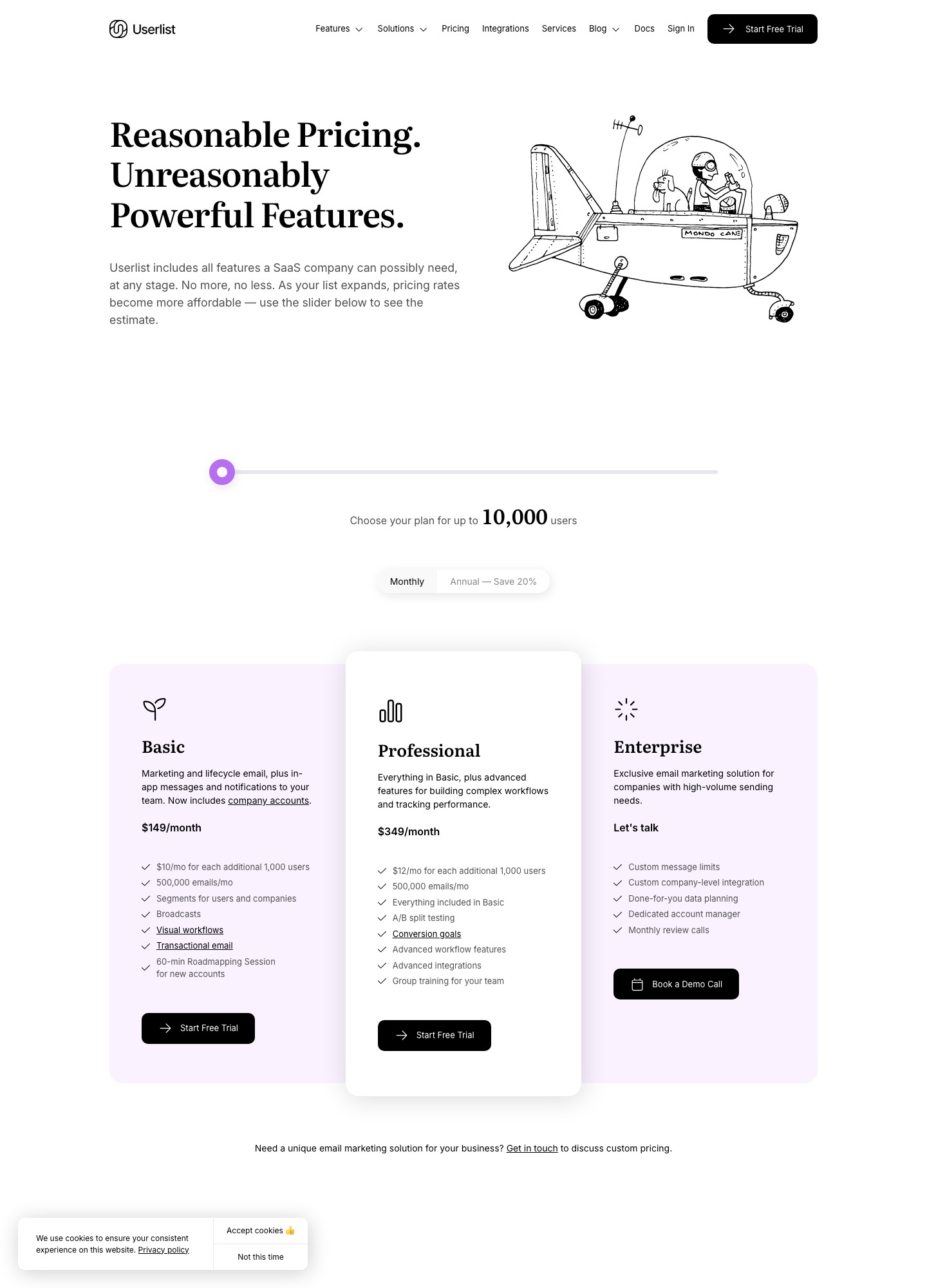
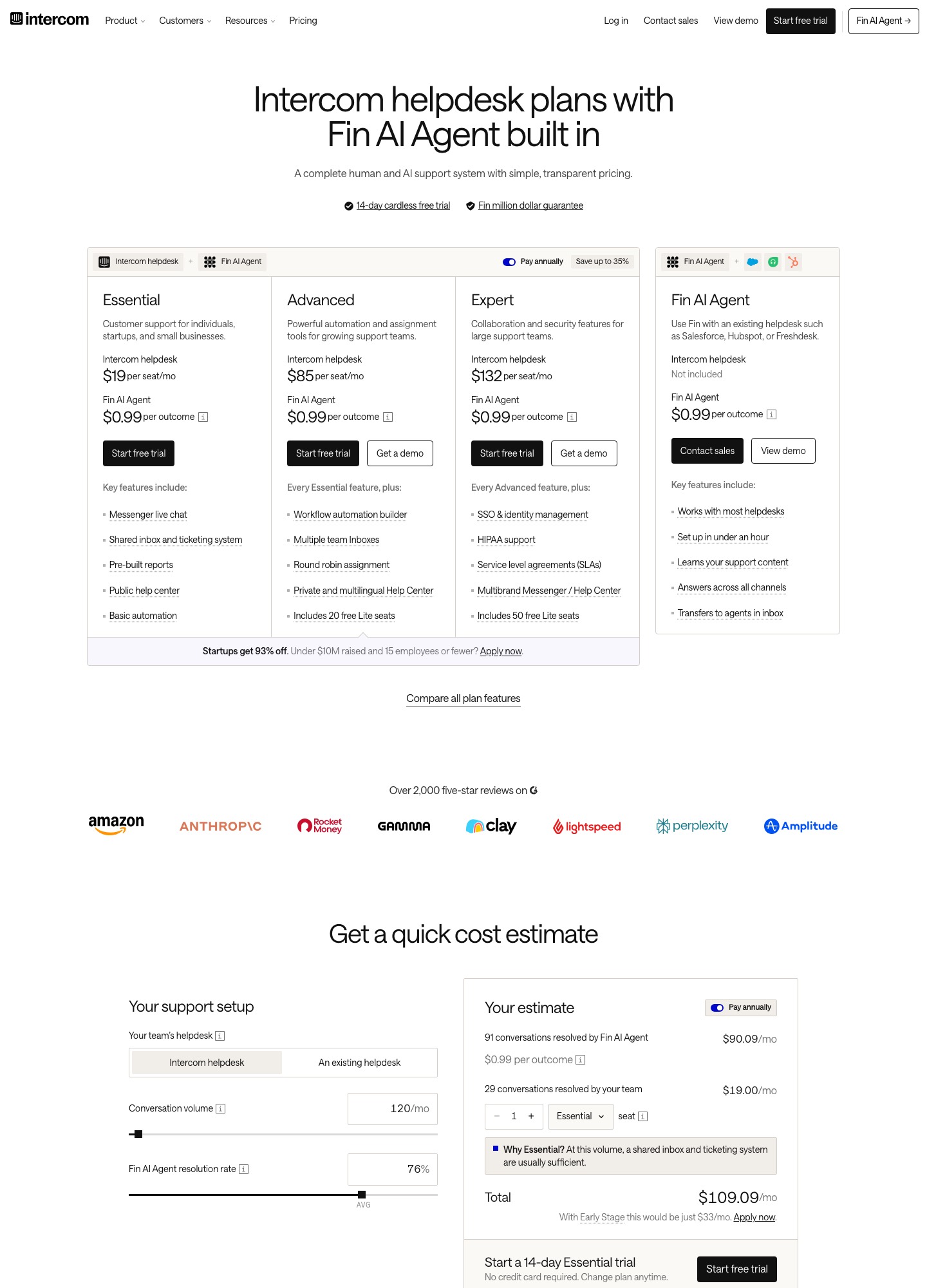
Choose Userlist when the job is lifecycle email, onboarding and in-app messages driven by what users and companies do, and you want a bill that follows your user count. Choose Intercom when customer support is the center of gravity and email is one of several channels around a helpdesk and the Fin AI agent. Userlist lists $149 a month for up to 10,000 users; Intercom starts at $19 per seat per month, plus usage.
These two are often shortlisted because both promise "messages to the right customer at the right time," but they are priced and built for different owners. Userlist is run by whoever owns lifecycle marketing: its pricing page leads with email, in-app messages, segments for users and companies, workflows and broadcasts. Intercom's pricing page leads with a helpdesk and the Fin AI agent, charges per seat, and treats outbound email campaigns as a pay-as-you-go channel. Which one is cheaper depends almost entirely on how many support agents you have versus how many users you message.
Side by side
| Decision point | Userlist | Intercom |
|---|---|---|
| Entry price | Basic $149/mo for up to 10,000 users; Professional $349/mo | Essential $19, Advanced $85, Expert $132 per seat per month (annual billing selected) |
| Billing unit | Users, counted as the 30-day high-water mark, all users whether active or not; $10 (Basic) or $12 (Professional) per extra 1,000 users | Seats plus usage: Fin at $0.99 per outcome, email campaigns charged per bulk email, SMS and WhatsApp per message |
| Included email volume | 500,000 emails a month on the plans we sampled | Inbound support email included; outbound campaigns metered |
| Automation | Visual workflow builder on Basic; A/B split tests, conversion goals and advanced logic on Professional | Basic automation on Essential; workflow automation builder on Advanced |
| Segmentation and data model | Segments for users and companies, company accounts, 20 or 50 custom properties, 20 events on Basic and unlimited on Professional | Helpdesk records and Messenger conversations; outbound content needs a Full seat |
| In-app messaging | In-app messages and internal team notifications on both plans | Posts, checklists, product tours, surveys and Series in the $99/mo Proactive Support Plus add-on (500 messages included) |
| Integrations | Direct API, CDP integrations, third-party and advanced integrations on Professional | Fin can work alongside Salesforce, HubSpot or Freshdesk helpdesks |
| Free trial and discounts | 14 days, card required; 50% off year one if you raised under $500k | 14 days, no card; Early Stage program takes 93% off for companies under $10M raised and 15 or fewer employees |
| Deliverability features | Custom sending domains and multiple sender profiles are listed in the plan table | Not described on the pricing page for outbound email |
Both columns come from the vendors' own pricing pages. The Userlist dollar figures are the plan prices its slider displayed with monthly billing; the page also offers a 20% discount for annual billing.
Cost at three list sizes
Because Intercom bills seats and Userlist bills users, the comparison needs an assumption. These rows assume a three-person team that sends messages (three Full seats on Intercom) and a product that messages its whole base. Intercom's usage charges on top are not published as a per-email rate on the page, so that column is a floor, not a total.
| Users | Userlist Basic | Userlist Professional | Intercom, three seats (floor, before usage) |
|---|---|---|---|
| 10,000 | $149/mo | $349/mo | Essential $57, Advanced $255, Expert $396 per month, plus the $99 add-on for in-app messages if you want tours |
| 18,000 | $229/mo | $445/mo | Same seat cost; per-email and add-on usage grows with sends |
| 32,000 | $369/mo | $613/mo | Same seat cost; the usage meter decides the total |
Arithmetic is simple on Userlist: Basic is $149 at 10,000 users and adds $10 for each further 1,000, so 18,000 users is $149 + 8 × $10 = $229. Intercom does not scale with users at all on the seat portion, so its bill is flat until you send. A team that mostly answers support tickets and sends the occasional announcement might pay less on Intercom Essential at $57 for three seats than on Userlist. A team that runs a full onboarding series to every new user, however, enters Intercom's metered territory: email campaigns are "charged per bulk email sent," and in-app messages beyond the first 500 on the $99 Proactive add-on are charged per unit, with no rate shown on the page. That is the cost to ask a sales rep about before you decide.
Where Userlist fits
Userlist is a lifecycle tool first. Basic includes marketing and lifecycle email, in-app messages, notifications to your own team, company accounts, segments for both users and companies, a visual workflow builder, broadcasts and transactional email. That covers the standard SaaS arc: welcome, activation nudge, trial-ending reminder, and a message when a teammate invites someone. Professional is worth the jump if you intend to run A/B split tests and conversion goals, or need company-triggered campaigns and advanced integrations; Basic limits you to 20 custom properties and 20 events, which a mature product can outgrow.
The pricing has some sharp corners. Userlist counts all users, active or not, which is why its FAQ suggests removing abandoned accounts via the API to reduce cost. It also takes card details upfront for the 14-day trial. The upside is a roadmapping session for new accounts on Basic and group training on Professional, which suits a small team without a lifecycle specialist.
Where Intercom fits
Intercom fits when support and success own the customer conversation. Essential includes live-chat Messenger, a shared inbox and ticketing, pre-built reports and a public help center, and the Fin AI agent is priced at $0.99 per outcome across plans. Advanced adds a workflow automation builder, multiple team inboxes, round-robin assignment and 20 free Lite seats; Expert adds SSO, HIPAA support, SLAs and 50 Lite seats. The Early Stage program is substantial for small teams: 93% off for companies that have raised under $10M and have 15 or fewer employees.
As an email tool it is the more awkward of the two. Outbound campaigns are metered, proactive in-app content sits in an add-on, and only Full seats can send messages, so adding a lifecycle marketer adds a seat charge. Treat Intercom as a support platform with messaging attached, not as a replacement for a lifecycle email system.
Choose Userlist if…
- Onboarding, activation and trial-conversion email are the job to be done.
- You model companies as well as people and want company-triggered campaigns.
- You prefer a cost that follows the user count over a meter on every message.
- A product marketer, not a support lead, will own the tool.
Choose Intercom if…
- Chat, tickets and an AI agent for support are the priority.
- You will use Fin and are comfortable paying $0.99 per resolved outcome.
- You qualify for the Early Stage discount.
- Outbound messages are occasional announcements, not the main program.
Migration notes
From Intercom to Userlist, export users and companies with their attributes and tags, then decide which Intercom events become Userlist custom events; Basic allows 20, so prioritise the ones that trigger messages. Intercom Series or tours will need to be rebuilt as Userlist workflows and in-app messages. Keep Intercom's helpdesk running for support while outbound email moves, since Userlist does not replace a ticketing system.
From Userlist to Intercom, expect the data model to shrink to people and companies in the Intercom workspace, and expect to re-create workflow logic in the Advanced workflow builder. Decide who needs a Full seat before you import, as only Full seats can send outbound content, and check the Proactive Support Plus message allowance against your largest onboarding wave.
FAQ
Is Userlist or Intercom cheaper?
With three message-sending seats, Intercom Essential's seat cost of $57 a month is below Userlist's $149 starting price, but it excludes Fin, bulk-email and add-on usage. At volume and with outbound email as the core job, Userlist's flat user-based price is easier to forecast.
Does Intercom send marketing email?
Yes, as a pay-as-you-go channel: its pricing FAQ lists email campaigns as charged per bulk email sent. No per-email price appears on the page.
Does Userlist have a free plan?
No free plan is listed. It offers a 14-day free trial with card details required, and a 50% discount for the first twelve months if you raised under $500k in total funding.
Can I run both?
Many teams do: Intercom for support conversations and Userlist for lifecycle email. The cost is two user stores to keep in sync, so decide which system owns identity.
Continue with Userlist alternatives, Encharge vs Customer.io, or browse the SaaS comparisons hub. See our evaluation method.