SaaS lifecycle comparison · Prices checked October 7, 2026
ConvertKit (Kit) vs Mailchimp: Pricing and Fit for SaaS
For a software product with a content or creator-style audience, Kit (the product formerly called ConvertKit) is the better value: its free plan holds up to 10,000 subscribers, and Creator is $75 a month at 5,000 against $100 for Mailchimp Standard. Mailchimp wins when the same list feeds storefront campaigns, popup forms and SMS, or when the team already lives in it. Neither is a product-event tool, so check your trigger needs before choosing.
People still search for ConvertKit, but the company now trades as Kit and its pricing page uses that name. The comparison with Mailchimp is a good test of two philosophies. Kit sells a creator business toolkit: forms, landing pages, broadcasts, sequences and digital product sales, with the price rising by subscriber band. Mailchimp is a generalist marketing platform with four plans, a contact selector, and a send allowance that scales with the band. A SaaS company reaches for either when its audience is closer to readers, students or buyers than to in-app users.
Side by side
| Decision point | Kit | Mailchimp |
|---|---|---|
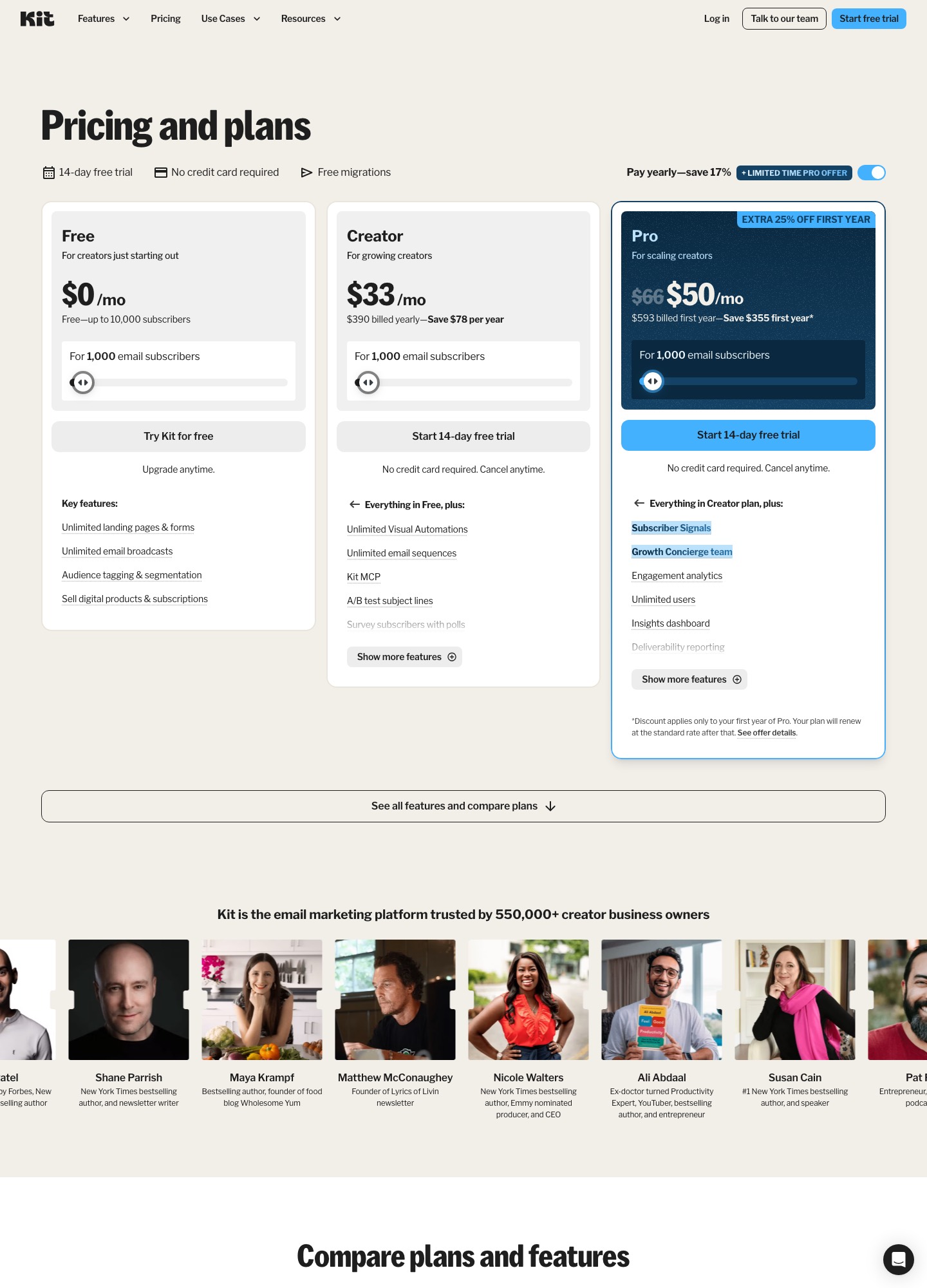
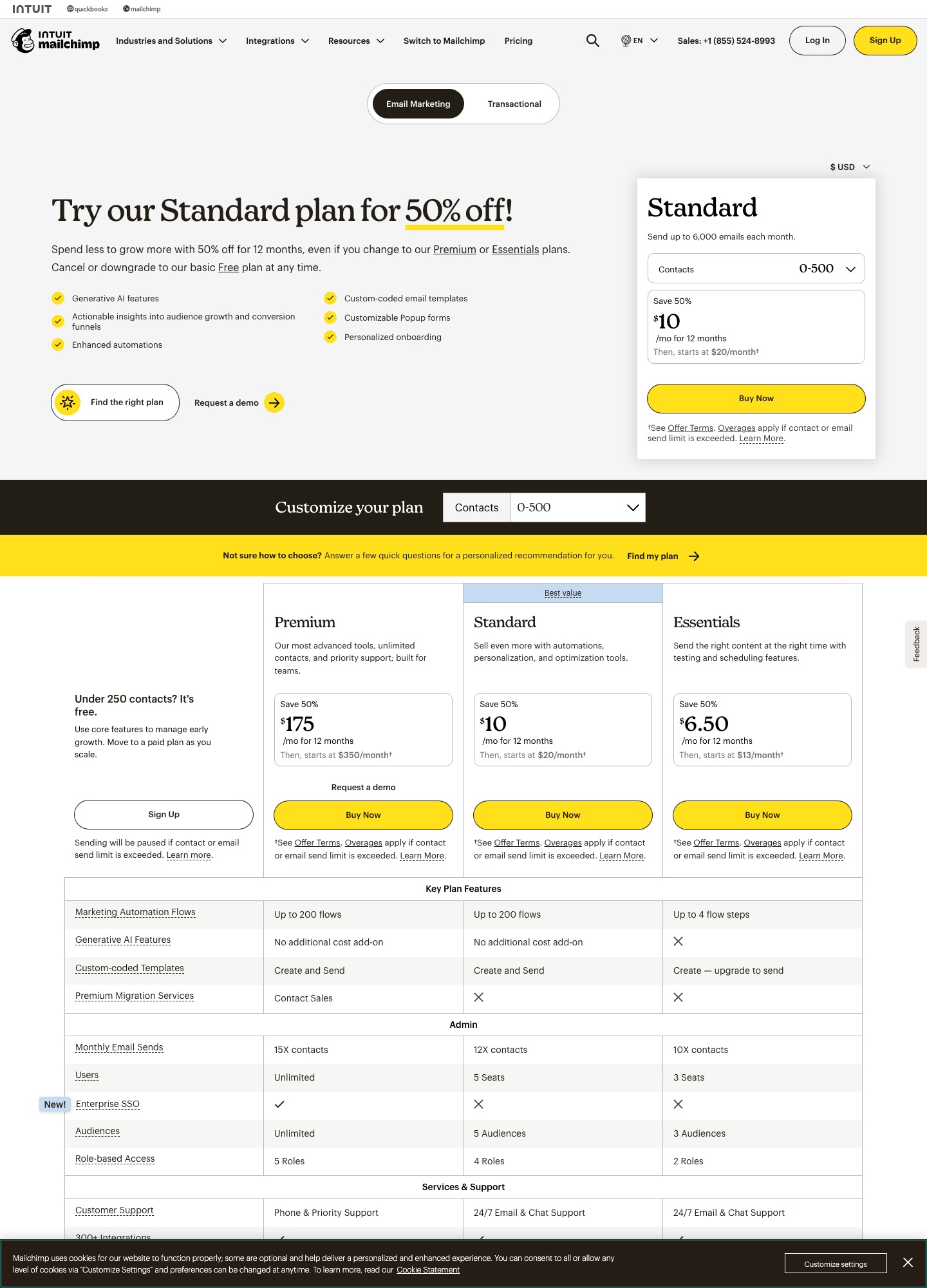
| Free plan | Free up to 10,000 subscribers: unlimited landing pages, forms and email broadcasts, tagging and segmentation, digital product sales | Up to 250 contacts and 500 sends a month (250 a day), one audience |
| Entry paid price | Creator $33/mo at 1,000 subscribers ($390 billed yearly); Pro $66/mo | Standard from $20/mo at 500 contacts |
| Paid pricing unit | Subscribers, shown on a slider | Contact band; Standard sends up to 12× the contact count each month |
| Automation | Visual Automations and email sequences are unlimited from Creator upward; not on Free | Enhanced automations on Standard; A/B and multivariate testing |
| Segmentation | Tagging and segmentation on every plan | Audience segmentation |
| Integrations | Apps and integrations from Creator, a Kit App Store and an MCP server | Shopify, WooCommerce, Canva, Zapier, Square, Wix, Salesforce, WordPress |
| Deliverability and reporting | Deliverability reporting, engagement analytics and subscriber engagement scoring on Pro | Actionable insights into audience growth and conversion funnels on Standard |
| Other channels and sales | SMS marketing on Creator; sell digital products and subscriptions on every plan | SMS marketing, popup forms, generative AI features |
| Trial and migration | 14-day free trial, no card; free migrations | 14-day Standard trial; contact-limit overages apply |
All rows come from the two pricing pages. Kit quotes its paid tiers at a yearly-billed monthly rate by default, so that is what the cost table below uses for Kit, while Mailchimp's figures are its Standard monthly list price. The billing bases are not identical, which favors Kit slightly in a straight read.
Cost at three list sizes
| Subscribers | Kit Creator | Kit Pro | Mailchimp Standard |
|---|---|---|---|
| 5,000 | $75/mo | $116/mo | $100/mo (2,501–5,000 band) |
| 10,000 | $116/mo | $158/mo | $135/mo (5,001–10,000 band); Kit Free still covers this size without automations |
| 25,000 | $166/mo | $233/mo | $310/mo (20,001–25,000 band) |
Mailchimp's page was also showing a 50% first-year offer on Standard, which would halve the first-year figures above but reverts to the list prices afterward. Kit advertised a limited-time first-year discount on Pro. Compare steady-state numbers if you plan to stay longer than a year.
Two real cases show where the lines cross. A founder with a 4,000-person waitlist who only sends a weekly update fits Kit Free, which covers up to 10,000 subscribers, and pays nothing; the same list on Mailchimp would exceed its 250-contact free limit and land on Standard at $100. A team with 25,000 subscribers that wants automated sequences pays $166 a month for Kit Creator, while Mailchimp Standard lists $310 for its 20,001–25,000 band. Those gaps compound if you add Pro features such as engagement scoring and deliverability reporting.
Where Kit fits
Kit is the less expensive route when your product is partly an audience business: a developer tool with a newsletter, an indie SaaS selling templates or courses, or a community product that sells subscriptions. Free includes the whole acquisition front end, meaning forms, landing pages, unlimited broadcasts and tagging, and lets you sell digital products; the automation layer arrives with Creator. Pro adds unlimited users, engagement analytics, subscriber scoring and a referral system, which suits a team publishing weekly.
The gaps matter to SaaS buyers. Nothing on the pricing page describes product-event triggers or account-level data, so lifecycle emails based on in-app behavior need Zapier or a custom bridge. The page also puts SMS on Creator rather than Free, and makes the discounted first-year Pro price time-limited.
Where Mailchimp fits
Mailchimp is stronger when the list needs breadth. The Standard plan lists generative AI, custom-coded templates, enhanced automations, popup forms and multivariate tests, and the integration catalog reaches commerce and website tools that Kit's page does not name. Teams that already have audiences, templates and brand assets in Mailchimp save the migration effort, and its 14-day Standard trial is easy to try without a card. The costs are the steep step between bands (from $135 at 10,000 to $230 above it, per the contact selector) and the cap on sends at 12 times your contact count.
For SaaS teams that care about transactional email: Mailchimp's page links a separate Transactional product, while Kit's pricing page does not mention a transactional service, so neither covers password resets inside a single account. Plan a separate sender either way.
Choose Kit if…
- Your list is under 10,000 and you only need broadcasts, forms and landing pages.
- You sell digital products or subscriptions alongside the software.
- You want automations and sequences at a lower price than Mailchimp Standard.
- You write to your audience regularly and want engagement scoring and referrals.
Choose Mailchimp if…
- You need ecommerce, popup forms and SMS in one platform.
- You already maintain templates and audiences there.
- You want multivariate testing across up to eight variations.
- Your team prefers its integration catalog (Shopify, WooCommerce, Salesforce, WordPress).
Migration notes
Kit says its migrations are free, and its pricing page shows the offer next to the 14-day trial. When moving from Mailchimp to Kit, export your audience with merge fields and tags, map Mailchimp groups to Kit tags, and rebuild each automation as a Visual Automation. Leave unsubscribed and cleaned contacts behind, since you pay by subscriber count on the Kit side.
Moving from Kit to Mailchimp mainly means turning tags into segments and condensing Visual Automations into Mailchimp's journey builder. Count your contacts before you pick a band; the selector bands jump, and the Standard send cap is 12 times your maximum contact count. Keep the old tool alive for a week after the switch so in-flight sequences finish.
FAQ
Is ConvertKit the same as Kit?
Yes. The company now uses the Kit name, and the pricing page at kit.com/pricing is the current ConvertKit pricing. Searches for ConvertKit land on the same product.
Which has the better free plan?
Kit, by a wide margin for list size: up to 10,000 subscribers with unlimited broadcasts, forms and landing pages. Mailchimp's free plan stops at 250 contacts and 500 sends a month, and Kit's does not include automations.
Which is cheaper at 10,000 subscribers?
On the list prices we read, Kit Creator is $116 a month and Mailchimp Standard $135 for the 5,001–10,000 band. Kit's Free plan is $0 if you do not need automations.
Can either replace product lifecycle email?
Not on their own for event-driven in-app triggers. Both are better for newsletters and campaigns; pair them with a product-event tool if onboarding depends on user actions.
Continue with ConvertKit alternatives, Mailchimp alternatives, Loops vs Mailchimp, or browse the SaaS comparisons hub. See our evaluation method.